


- Messages : 2
- Remerciements reçus 0
No line break in PDF
- NScom3elles24
- Auteur du sujet
- Hors Ligne
- Membre
-

Moins
Plus d'informations
il y a 1 an 4 mois - il y a 1 an 4 mois #84
par NScom3elles24
No line break in PDF a été créé par NScom3elles24
hello,
we have created posts with custom fields and then converted them into a PDF with the PDF generator. So far so good.
BUT: No line breaks/blank lines are displayed!
We are at a loss and hope you have the solution. You can find the access data under “Private Message”. Thank you very much
Content, is OK:
a2j.cms-testseite.de/images/Support/content2.jpg
PDF, is wrong:
a2j.cms-testseite.de/images/Support/PDF.jpg
Joomla 5.3.1
PHP 8.3
PDF Generator 2.0.3
we have created posts with custom fields and then converted them into a PDF with the PDF generator. So far so good.
BUT: No line breaks/blank lines are displayed!
We are at a loss and hope you have the solution. You can find the access data under “Private Message”. Thank you very much
Content, is OK:
a2j.cms-testseite.de/images/Support/content2.jpg
PDF, is wrong:
a2j.cms-testseite.de/images/Support/PDF.jpg
Joomla 5.3.1
PHP 8.3
PDF Generator 2.0.3
Dernière édition: il y a 1 an 4 mois par NScom3elles24.
Connexion ou Créer un compte pour participer à la conversation.
- shane
- Hors Ligne
- Admin
-

Moins
Plus d'informations
- Messages : 19
- Remerciements reçus 1
il y a 1 an 4 mois - il y a 1 an 4 mois #85
par shane
Réponse de shane sur le sujet No line break in PDF
Hi, and thank you for reaching out!
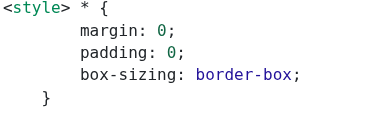
The issue you're experiencing is due to a CSS reset rule. You can read more about it in this article: dev.to/ziratsu/css-reset-58h9
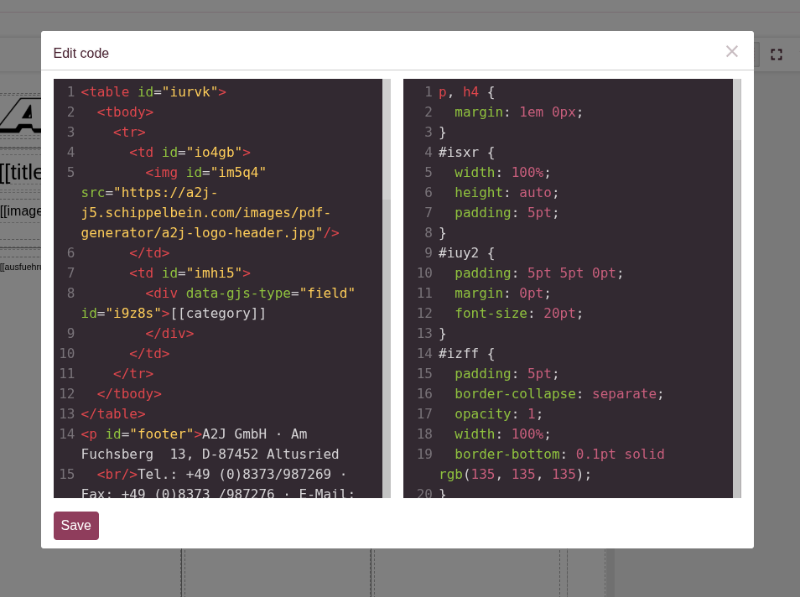
Here’s the rule causing the behavior, also shown in the screenshots:
To fix this, I added some custom CSS to your template. You can do this yourself via the Code View. For more details, feel free to check out our documentation on this feature.Here’s the CSS I added to restore some default spacing for text elements:
At the moment, we recommend this solution since removing the global CSS reset could affect existing templates. However, if more users report this issue or request changes to the reset, we may consider adjusting it in a future update.Let us know if you need further help!
The issue you're experiencing is due to a CSS reset rule. You can read more about it in this article: dev.to/ziratsu/css-reset-58h9
Here’s the rule causing the behavior, also shown in the screenshots:
Code:
* {
box-sizing: border-box;
margin: 0;
padding: 0;
}
To fix this, I added some custom CSS to your template. You can do this yourself via the Code View. For more details, feel free to check out our documentation on this feature.Here’s the CSS I added to restore some default spacing for text elements:
Code:
p, h3, ul {
margin: 1em 0;
}
At the moment, we recommend this solution since removing the global CSS reset could affect existing templates. However, if more users report this issue or request changes to the reset, we may consider adjusting it in a future update.Let us know if you need further help!
Dernière édition: il y a 1 an 4 mois par shane.
Connexion ou Créer un compte pour participer à la conversation.
- NScom3elles24
- Auteur du sujet
- Hors Ligne
- Membre
-
Moins
Plus d'informations
- Messages : 2
- Remerciements reçus 0
il y a 1 an 4 mois #86
par NScom3elles24
Réponse de NScom3elles24 sur le sujet No line break in PDF
Great, you have helped us a lot with this.
Thank you very much.
Thank you very much.
Connexion ou Créer un compte pour participer à la conversation.
- yberges
- Hors Ligne
- Admin
-
Moins
Plus d'informations
- Messages : 37
- Remerciements reçus 2
il y a 1 an 4 mois #87
par yberges
Réponse de yberges sur le sujet No line break in PDF
thanks for return think to post a good review on jed
extensions.joomla.org/extension/pdf-generator/
extensions.joomla.org/extension/pdf-generator/
Connexion ou Créer un compte pour participer à la conversation.
